dyson vacuum cleaner won't turn on

My Dyson Won't Turn On Even though the Dyson vacuum changed the industry by offering the first bagless vacuum, you may find that it sometimes won't turn on. This is because the vacuum machine has a thermal safety system inside it that cuts the power when it begins to overheat. You have to wait at least one hour for it it to cool down when this happens, as the machine won't turn on until its recognizes it is cool enough to not overheat the motor. The vacuum can overheat because there is not a free flow of suction through the machine due to a blockage somewhere. When the Dyson powers off during operation, you should: remove and examine the foam filter for blockages verify the clear canister is free of blockages check hoses and u-bends to remove blockages clean the foam filter if dirty; you have to wait until the filter dries overnight before using it clean the other filters in the machine, depending on the model, as each is slightly different. Verify that, after cleaning the filter and reinserting into the machine, all the components fit together correctly before vacuuming.

If the bin isn't inserted correctly or you forget to insert the filters, the vacuum will not work correctly and will overheat. Since the mostly likely cause of the machine overheating is blocked or dirty filters, you must remove them and wash them by hand in cold water. To wash the filter in an upright machine: Turn off the machine and unplug it from the wall. Remove the clear dust bin from the machine by depressing the button on the handle that releases it and lift it away from the machine. Detach the top of the bin by pressing the latch on the front of the bin and lift the top back. Reach in to remove the filter. The filter may be flat and round in a plastic case or it may be a cylinder-type filter, depending on the model you have. Some models have both. Remove the foam filter from the plastic cover, if you have that type of filter. Turn on the cold water and let it run from the faucet. Rinse the filter under cold water until all the fine dust is gone. Squeeze the filter gently to massage any dirt and dust from it under the running water.
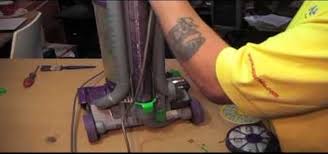
After the water coming from the wrung-out filter is clear, set the filter aside and let it air dry. For models equipped with the round plastic filter cover, rinse the fabric side of the cover in cold water, and then tap it gently to remove excess water and let it air dry. Set the cylinder-type filter horizontally to dry. Remove the second filter, if your machine has one, from the bottom of the machine. Models equipped with a ball device on the bottom have a filter that you can remove by turning the round inset knob counterclockwise to lift the cover from the filter. Lift the filter out and rinse it under cold water, tapping it to remove excess water after it is clean. Let it air dry. Do not use detergent to clean filters, only cold water. Do not dry the filters in an oven or a microwave, let them completely air-dry before inserting them back into the machine. When the machine works intermittently -- you could have a broken or faulty power switch. This is easy enough to replace for those handy with tools.

To replace the power switch, you'll need to know the serial number to order the correct part for the machine.
hoover vacuum cleaners filtersTo save money, you can order the same part for much less than you can get it from the manufacturer from reputable online sites that sell replacement parts.
cyclone vacuum cleaner design On the upright machine, look for the serial number imprinted on a plate sticker:
top vax vacuum cleaners behind the plastic wand or hose at the bottom of the machine or on the body of the machine behind the clear collection canister. For canister-type machines, look: between the wheels beneath the machine or on the body of the machine behind the dirt bin. A faulty power cord can also cause intermittent power in the machine.

Replace frayed or broken cords immediately to prevent shock or injury. My Dyson Won't Turn On. My Dyson Vacuum Cleaner's Beater Brush Won't Spin. How to Take Apart the Dyson Vacuum for Cleaning.... The Brush Won't Spin on My Dyson Vacuum Cleaner. My Dyson Won't Turn On. The Dyson device is a special brand...My Harley Won't Start. Harley-Davidson motorcycles require three conditions to be met... My Dyson Vacuum Will Not Turn On. How to Troubleshoot a Dyson. How to Troubleshoot a Dyson Hand Vacuum. The Dyson Animal Absolute upright vacuum cleaners have several attachments that ... How to Troubleshoot a Dyson DC17 Absolute Animal Upright Vacuum... The Dyson DC07 is an upright vacuum that uses cyclone technology as opposed to a traditional ... Turn off and unplug the... How to Troubleshoot a Dyson DC14. Dyson vacuums use a cyclone technology to spin dirt and debris out of the air, ...... Dyson Animal vacuums feature Dyson's patented root technology. My Dyson's Animal Brush Is Not Turning;

How to Reset a Dyson Vacuum; How to Reset a GFI Breaker; How to Replace a Kenmore Dishwasher's Thermal Fuse; How to Fix a Dyson Vacuum How to Fix a Dyson Spin Brush The Brush Won't Spin on My Dyson Vacuum Cleaner How to Troubleshoot a Dyson Vacuum Cleaner That Is Not Sucking Why Is My Dyson Cleaner Overheating? How to Troubleshoot a DysonNo matter the model, always power down and unplug your Dyson vacuum cleaner before troubleshooting. Originally released in 2011, the Dyson DC17 Animal -- part of the company's Absolute line -- has since been usurped by models such as the DC65 Animal Complete and the DC50 Animal. Like its successors, this upright model features a rotating brush bar and a high-efficiency particulate air filter -- both staples of many upright vacs, but also susceptible to complications without some maintenance and attention. If your DC17 Animal gets a little too wild, turn to troubleshooting tips directly from Dyson. Absolutely Basics If your Dyson vacuum won't start, the reason could simply be a power failure.
In addition to a blown fuse or tripped breaker, a loose plug may cause failure. The DC17 uses a polarized plug -- meaning one blade is wider than the other -- so you may need to reverse the plug and reinsert it into the socket for a secure fit. If your Dyson DC17 turns off while cleaning with the hose attachment, a blockage may be to blame. Inspect the device's air hose for blockage, and remove the obstruction. Then allow the machine to cool completely before restarting. To prevent operating errors, never use your DC17 outdoors or on wet surfaces. Clean and Clear To ensure maximum cleaning power, empty the DC17 Animal's clear bin before every use. If the bin has lots of buildup, which may obstruct suction power, clean inside the bin with a cloth or dry brush. Likewise, cleaning the Animal's filter can remedy sub-par suction. Rinse the filter under warm water, and allow it to air dry completely before reinstalling it. Dyson recommends performing this maintenance at least once every six months to ensure strong suction.

Brush Bar Blockage Reduced suction power, difficulty pushing the vacuum cleaner or debris dropping from the base may indicate a stuck brush bar. To remedy this, turn the Dyson DC17 over and lay it flat to view the underside of its base. Remove the soleplate cover by unscrewing its fasteners with a coin or small screw driver. Carefully cut away tangled hair and fibers on the brush bar until you can freely rotate the bar by hand, and then replace the soleplate. Contacting Dyson When regular troubleshooting doesn't address your Animal's issues, contact Dyson's Helpline at 1-866-9766. Dyson recommends calling in if your vacuum cleaner makes an unusual noise or produces odd odors. Before calling, write down your DC17's serial number, located behind the hose assembly between the wheels on the vacuum's base, or on the main body behind the bin. Because it's a 2011 model, the DC17's manufacturer warranty does not likely cover the cost of service or repair. References Dyson: Dyson Vacuum Cleaners Range: UprightsDyson: Dyson Absolute (DC17)Dyson: DC17 Animal: Support for DC17 AnimalDyson: Filter Washing VideoDyson: Check Brush Bar Step OneDyson: Check the Mini Turbine Head Step 2 Photo Credits Bruno Vincent/Getty Images News/Getty Images Suggest a Correction